MyForexJournal

Connect MT5 and keep your trading journal updated automatically.

No EA required
1
Create account
2
Connect MT5
3
Synchronise

Create your account

One MyForexJournal login can be used with multiple MT5 accounts.

Need help?

Send your MT5 account number and broker/server name. Never send your password.

Telegram Support

Your history is imported. Your deeper AI analysis starts from connection.

When you connect MyForexJournal, we automatically import your available historical MT5 trading data, so your existing performance and statistics are available from day one.

Deeper AI trade analysis begins with new trades placed after your account is connected. From that point, MyForexJournal preserves additional market context around every trade, including the five-minute candle structure before and after the trade. This allows the AI to analyse not only what you traded, but the market conditions surrounding your execution.

Historical trades remain available for performance reporting and statistics, while new trades receive the full AI coaching and market-context analysis.
More than a trade log

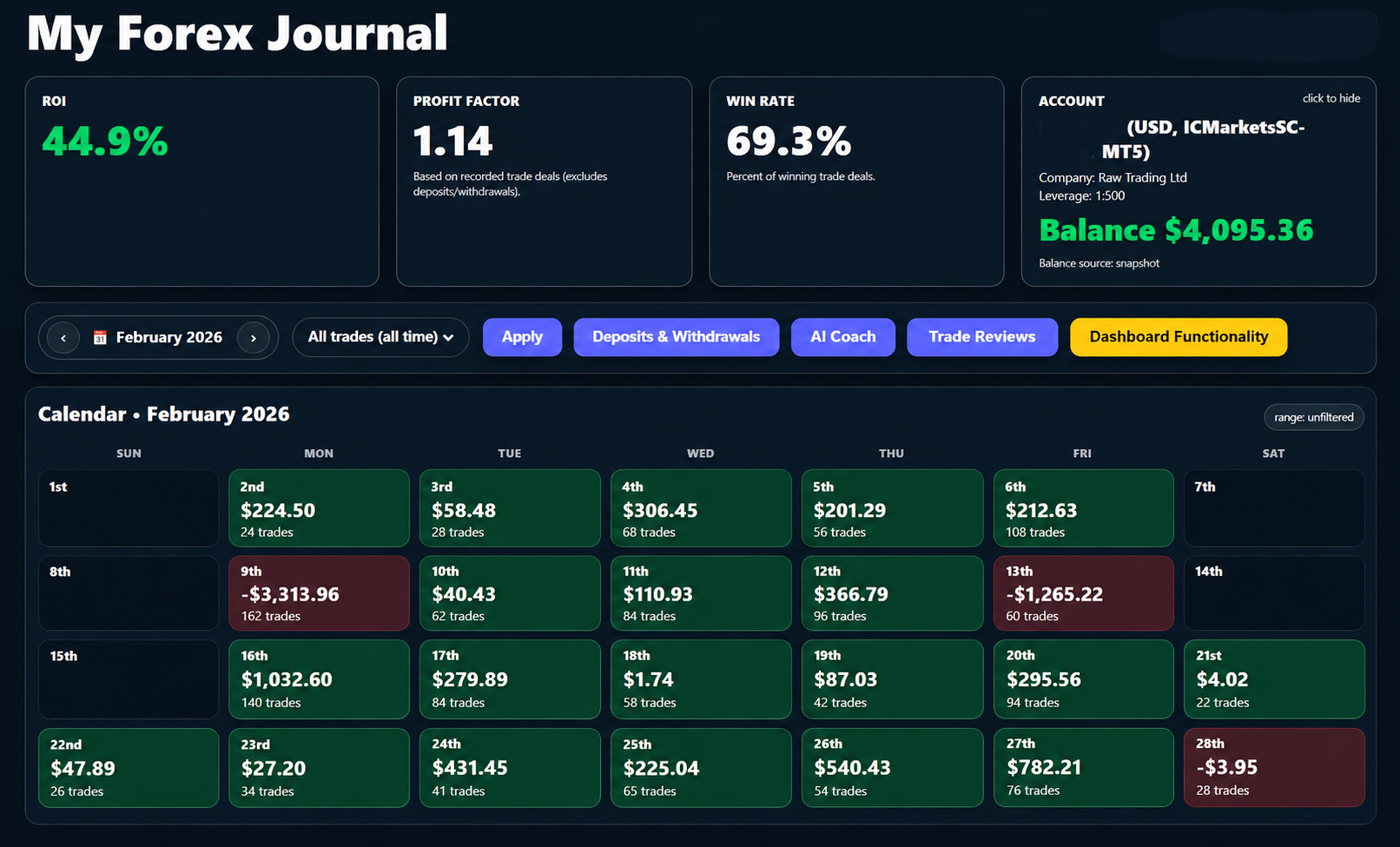
MyForexJournal turns your MT5 activity into a clear trading record you can actually learn from. Track your performance, explore individual trading days, manage multiple MT5 accounts and use AI-assisted reviews to examine supported trades against the strategy you have taught the journal.

01

Performance Dashboard

See total P&L, ROI, balance, win rate, profit factor and trading activity together in one clear dashboard.

02

Trading Calendar & History

Browse results by day and drill into the individual trades behind each trading session.

03

AI Trade Reviews

Review supporte trading strategy rather than generic rules.

04

Teach My Journal

Explain how you trade in your own words and create a strategy profile that AI Coach can use during reviews.

05

Automatic MT5 Updates

Keep your journal updated automatically without manually entering every trade or keeping an EA running.

06

Multiple MT5 Accounts

Connect multiple MT5 accounts to one login and switch between their statistics whenever you need to.

See the bigger picture

Know how you are actually performing

Move beyond account balance alone. MyForexJournal brings together the figures that help you understand profitability, consistency and trading behaviour across your selected MT5 account.

See MyForexJournal in action

See how the journal actually works

These short narrated demonstrations show the complete journey: connecting your MT5 account, teaching AI Coach the way you trade, and using your strategy to review a completed trade.

Demo 1 • 30 seconds

How MyForexJournal Works

See how a customer creates a login, securely connects an MT5 account using an investor/read-only password, synchronises trading history and reaches the performance dashboard.

Press play to watch with English narration.
Demo 2 • 30 seconds

Train Your AI Coach

Give your assistant a name, answer guided questions about the way you trade, review the generated strategy profile and confirm it for use in future trade reviews.

Press play to watch with English narration.
Demo 3 • 30 seconds

AI Full Trade Review

Select a recorded trade and see how AI Coach combines the trade evidence with your saved strategy to review entry quality, risk, management, exit decisions and recurring execution patterns.

Press play to watch with English narration.

Ready to see your trading more clearly?

Create your MyForexJournal login, connect MT5 using your investor/read-only password and let the journal build your trading record automatically.